
How to Turn Old Samples Into New Ideas with Glitch Lab

Updated: Jul 22
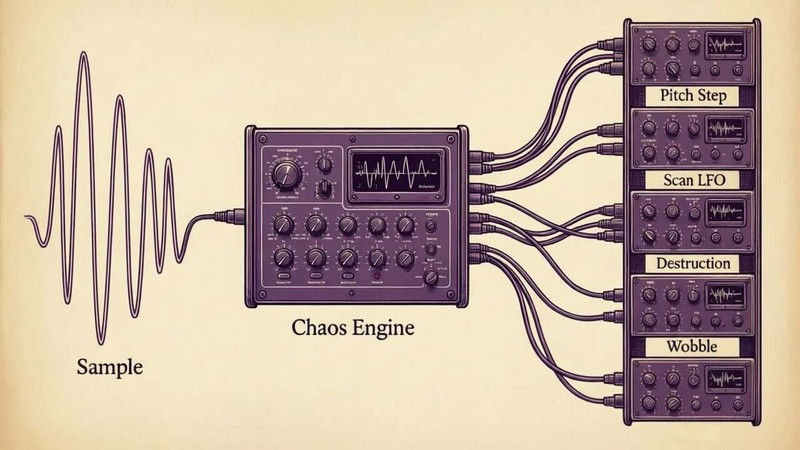
If you have thousands of samples but struggle to find new ideas in them, tools like Glitch Lab can completely change how you use your library.
Instead of constantly searching for new sounds:
Rediscover the ones you already have.
The Problem: Too Many Samples, Too Little Inspiration
You have thousands of samples.
Drums. Vocals. Textures. Loops. One-shots.
Entire folders of sounds that once felt exciting.But after a while something happens. You scroll through them and nothing really jumps out anymore. Not because the sounds are bad.
They just feel familiar.
That’s one of the strange things about samples.
They don’t stop being useful.
They just stop surprising you.
Creative Ways to Transform Samples with Glitch Processing
One way to break that familiarity is by changing how the sample behaves.
Instead of playing the sound from start to finish in the same way every time, glitch and granular tools allow you to reinterpret the audio.
The recording becomes less like a finished object and more like material you can move through.
You can land on tiny fragments, repeat them rhythmically, reshape the pitch, distort them, filter them, or move through the sound continuously.
That’s where something like Glitch Lab becomes interesting.

Where Glitch Lab Comes In
Instead of treating a sample like a fixed recording, the system breaks it into small grains and allows those fragments to be retriggered, repositioned, and reshaped.
The result is that the same sample can suddenly start behaving differently.
A chord might become a rhythmic pattern.
A vocal snippet might turn into something melodic.
A texture might begin to pulse like a groove.
Nothing about the original recording has changed.
Only how it is being read.
Instant Inspiration: The Chaos Button
At the centre of Glitch Lab is one control: Chaos.
Press it once and the system generates a new configuration of grain sizes, pitch movement, sequencing and modulation.
Sometimes the change is subtle.
Other times the sample becomes something completely different.
A chord suddenly behaves like a melody.
A texture starts outlining a rhythm.
A vocal fragment turns into something strange and musical.
Discovering Hidden Moments
One thing you quickly realise when working this way is that most samples contain interesting moments you would never normally hear.
Small fragments inside the recording.
A harmonic that appears for a split second.
A strange transient between notes.
When you start scanning through the audio in grains, those tiny details suddenly become usable material.
Sometimes the most interesting sound ends up being something that originally lasted less than half a second.
Chaos First, Control After
The Chaos button is really just a way of finding ideas quickly.
Once something interesting appears, you can begin shaping it.
Glitch Lab gives you a lot of control over how the sample behaves:
Grain Position and Loop Size: Choose which part of the sample becomes the source.
Pitch Step Sequencing : Turn static sounds into melodic movement.
Scan LFO: Create motion across the sample.
Filtering and Resonance: Focus the tonal character.
Distortion and Bit Crushing: Add edge, weight, or digital texture.
The chaos generates the idea.
The controls allow you to refine it.
Turning Samples into Rhythms and Melodies
One of the surprising things about this approach is how quickly a sample can start producing musical movement.
Even if the original audio contains no rhythm, slicing and retriggering it against tempo can create patterns.
Pitch sequencing can introduce melodic shifts.
Modulation can keep the sound evolving instead of looping predictably.
In many cases a single sample becomes the source of an entire musical idea.
A Different Way to Use Your Library
Glitch Lab doesn’t just process audio; it reinterprets it. When recordings become flexible material instead of fixed objects, a single “old” sample can become the basis of an entirely new idea.
Glitch Lab free samples


Comments